
How to track sleep on Apple Watch: setup, sleep stages and what they mean (2026)
How to track sleep on Apple Watch: set up Sleep in the Health app, turn on Track Sleep with Apple Watch, charge before bed, then read Core, Deep, REM and Awake.
To track sleep on Apple Watch, open the Health app on your iPhone, set up Sleep (a sleep goal, a bedtime and wake-up time, and Sleep Focus), and turn on Track Sleep with Apple Watch. Then charge your watch to at least 30% before bed and wear it snugly through the night. In the morning, the Sleep app on your watch and the Health app on your iPhone show how long you slept and how much time you spent Awake and in REM, Core and Deep sleep.
Yes, the Apple Watch can track sleep on its own: no extra app, no subscription, no ring or band. Below are the exact steps, where to find your data, what each sleep stage means, and the extra overnight features (wrist temperature, breathing disturbances) your model may support.
How to set up sleep tracking on Apple Watch (step by step)
Before you start, update your iPhone to the latest iOS and your Apple Watch to the latest watchOS, as Apple recommends.
- Open the Health app on your iPhone, tap Browse, tap Sleep, tap Sleep again, then tap Get Started under Set Up Sleep, and tap Next.
- Set your sleep goal, the number of hours you'd like to spend asleep.
- Set your bedtime and wake-up time. You can create different schedules for weekdays and weekends.
- Turn on Sleep Focus. It quiets notifications and simplifies your Lock Screen and watch display at bedtime. You can still allow certain people or apps to reach you.
- Turn on Track Sleep with Apple Watch. This appears during setup if your watch is already paired. If not, you can turn it on later: on the watch, open Settings, tap Sleep and turn on Sleep Tracking, or on iPhone, open the Apple Watch app, tap My Watch, then Sleep.
- Turn on Charging Reminders. In the Apple Watch app on iPhone, tap My Watch, then Sleep, then Charging Reminders. Your watch will remind you to charge before your wind-down time.
- Charge your watch to at least 30% before bed. If the battery runs out overnight, your sleep won't be tracked. If you go to bed below 30%, the watch prompts you to charge it.
- Wear it snugly to bed. A loose watch can register extra movement and mistake it for being awake. Wear it for at least 1 hour of sleep to get data.
You can also set everything up from the watch itself: open the Sleep app, tap Continue, set your schedule, tap Next, choose whether to turn on overnight vitals, then tap Done.
Battery tips for overnight tracking
The most common reason for a "missing" night is a flat battery. A few habits help:
- Plan an evening top-up. Charging while you get ready for bed helps you start the night above 30%. In the morning, the watch's greeting shows how much charge remains.
- Let Charging Reminders do the remembering. They nudge you before wind-down and tell you when the watch is full.
- Use Sleep Focus. It turns off the watch display and limits distractions while you sleep.
Sleep Focus and Wind Down
Sleep Focus starts at your scheduled bedtime or, if you set one, at your Wind Down time beforehand. To change how early it begins, open the Sleep app on your watch, tap your wake-up alarm, scroll to Full Schedule and tap Wind Down. In the watch's Settings, under Sleep, you can also choose whether Sleep Focus turns on automatically at Wind Down, simplify the sleep screen, and show the time while it's active.
Where to see your sleep data
- On Apple Watch: open the Sleep app. You'll see your sleep score, time in each sleep stage, how much you slept last night and your average over the last 14 days. Turn the Digital Crown to scroll.
- On iPhone: open the Health app, tap Browse, then Sleep. The chart opens on the day view, and you can switch to week (W), month (M) or six months (6M).
- More detail on iPhone: tap Show More Sleep Data. Stages shows the time and percentage you spent Awake, in REM, Core and Deep sleep. Amounts compares your time asleep with your sleep goal. Comparisons shows heart rate and respiratory rate alongside your sleep, plus nightly wrist temperature changes on supported models.
Tip: add Sleep to your Favorites in the Health app to see it on the Summary page.
How does Apple Watch track sleep?
Your watch uses its sensors (including an accelerometer that detects movement) to estimate when you are asleep and which stage you're in. These are estimates, not a sleep-lab measurement, which records brain waves.
How good are they? In a 2024 study at Brigham and Women's Hospital, 35 healthy adults slept one night in a lab with an Apple Watch Series 8 and other trackers. The watch identified 97% of sleep correctly when telling sleep from wake, which is the foundation of your total sleep time. It was less precise at separating stages, underestimating deep sleep by about 43 minutes on average and overestimating light sleep by about 45 minutes. The study was small, lasted one night, was limited to healthy adults aged 20 to 50 and was funded by a competitor, so treat those figures as a rough guide. The takeaway: trust your watch for how long you slept and for trends, and read single-night stage minutes loosely.
Apple Watch sleep stages explained
| Stage on Apple Watch | What it is | What it does |
|---|---|---|
| Awake | Moments you were awake after falling asleep | A few brief wake-ups are normal; many long ones fragment your night |
| REM | Rapid eye movement sleep, the stage when most dreaming happens | Takes up more of the second half of the night |
| Core | Apple's name for light sleep | Usually the biggest share of the night |
| Deep | Slow-wave sleep, the deepest and most restful stage | Concentrated in the first half of the night |
What is Core sleep on Apple Watch?
Core sleep is Apple's label for light sleep. It is normal for Core to be the largest part of your night: light sleep links your cycles of deep and REM sleep together, and it still counts toward your rest. Seeing lots of Core sleep is not a sign that anything is wrong. In the lab study above, the watch actually tended to count a little more light sleep than the sleep lab did.
What about Deep sleep?
Deep sleep is a smaller slice of the night than Core. Because the watch tends to underestimate it, a low number on one night isn't cause for concern. Our guide to how much deep sleep you need gives typical amounts by age.
Wrist temperature: which models, and how it works
On Apple Watch Series 8 or later, any Apple Watch Ultra and Apple Watch SE 3, the watch measures your wrist temperature while you sleep, using two sensors that sample every five seconds. After about 5 nights (with Sleep Focus on for at least 4 hours a night), it sets your personal baseline and then shows each night as a change from it.
To see it, open the Health app, tap Search, then Body Measurements, then Wrist Temperature. Apple notes that alcohol, illness, your sleep environment, menstrual cycles and other factors can affect the reading, and that it isn't a medical device or a thermometer. For women in perimenopause or menopause, warmer-than-usual nights can be a useful clue when night sweats are waking you (see menopause night sweats remedies).
Breathing disturbances and sleep apnea notifications
On Apple Watch Series 9 or later, Apple Watch Ultra 2 or later and Apple Watch SE 3, the watch can track breathing disturbances, brief interruptions in breathing during sleep detected with the accelerometer. Each night is labeled Elevated or Not Elevated.
- Requirements: latest watchOS and iOS, Track Sleep with Apple Watch turned on, and at least 10 nights of wear within a 30-day period. The data is analyzed every 30 days.
- Notifications: if elevated readings are consistent over 30 days, you may get a notification about signs of moderate to severe sleep apnea, and you can export a PDF to share with your doctor.
- Where to see it: in the Health app, tap Browse, then Respiratory, then Breathing Disturbances.
- Limits: the feature is for people 18 and older who haven't been diagnosed with sleep apnea. It is not a diagnosis, and not everyone with sleep apnea gets a notification. If you think you might have it, talk to your doctor.
You can also see your respiratory rate during sleep: in the Health app, tap Browse, then Respiratory, then Respiratory Rate, then Show More Respiratory Rate Data.
How third-party apps like Sleepwrist read your sleep data
Everything your watch records at night is saved in Apple Health on your iPhone. Apps can only read the specific types of data you allow. When you first open an app like Sleepwrist, iOS asks which categories it may read (for example sleep, heart rate and wrist temperature). You can review or change that later in the Health app: tap the Profile button in the upper corner, then under Privacy tap Apps, and choose an app.
Sleepwrist works exactly this way. It doesn't need a new device, an account or a different way of wearing your watch: it reads the sleep your Apple Watch already records in Apple Health, with Apple's built-in sleep tracking turned on, and analyzes it on your iPhone. Your health data is never sold or shared.
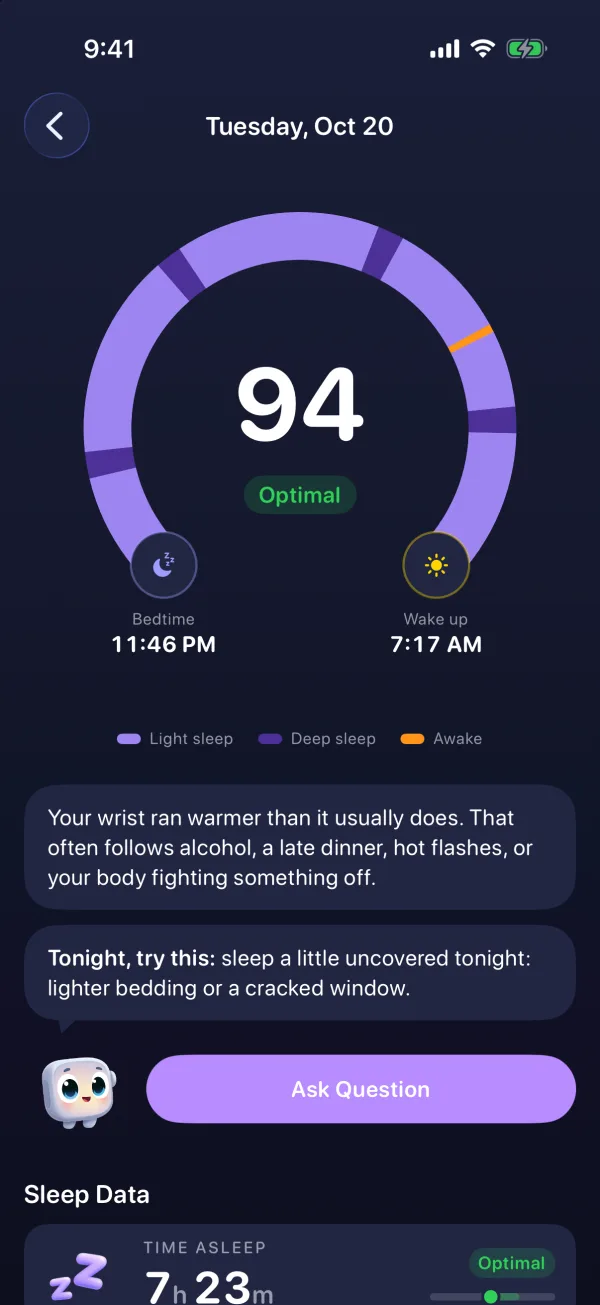
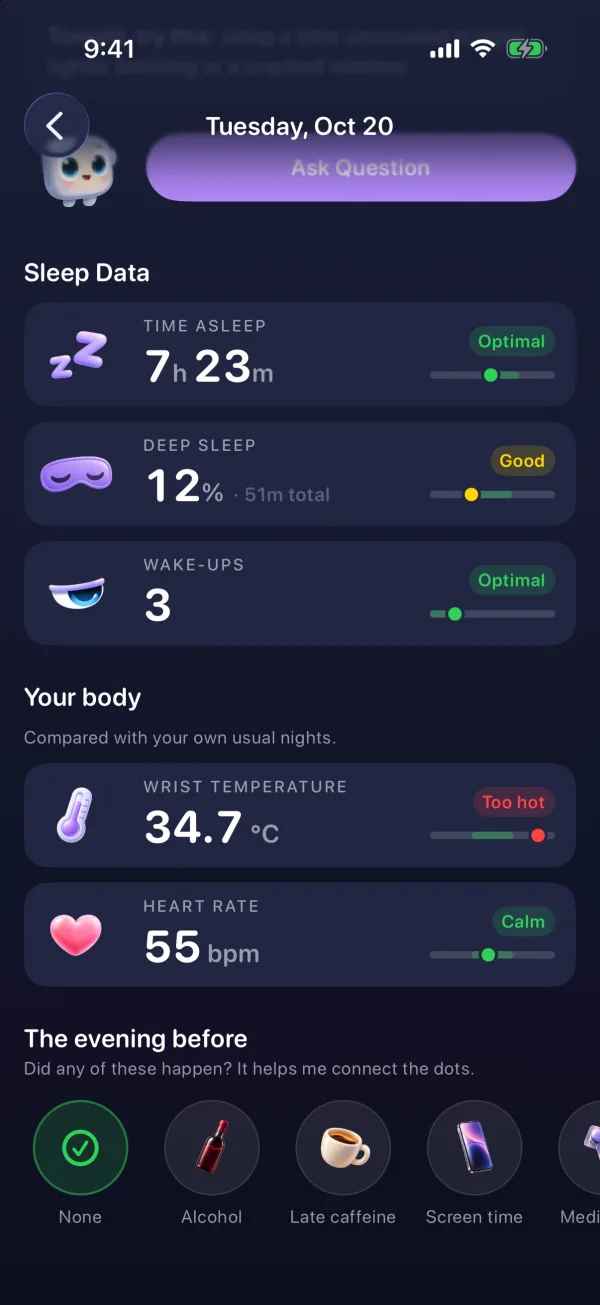
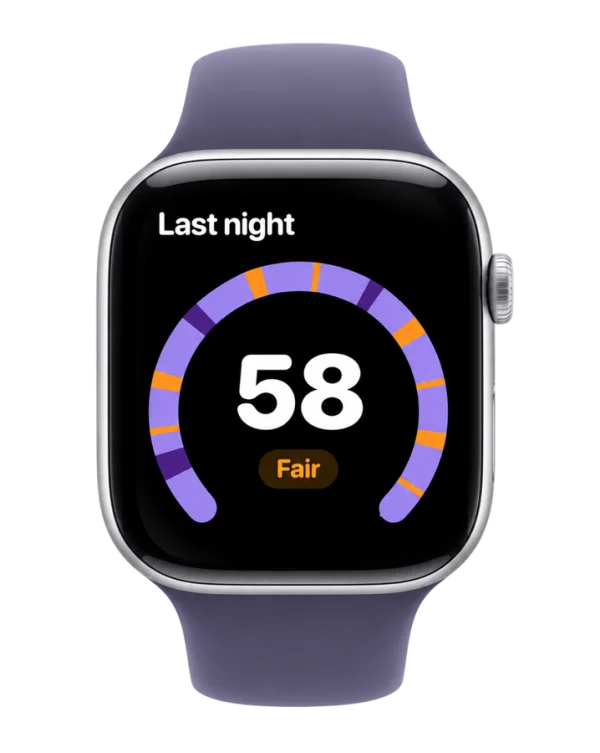
What it adds on top of the Health app:
- The arc of your night, a horseshoe from bedtime (moon) to wake-up (sun) colored by phase, with every wake-up marked in orange. Tap or slide your finger along it to see what happened at that minute.
- A sleep score from 0 to 100 told in words first (Optimal, Good, Fair, Poor), built from time asleep, deep sleep, REM sleep, efficiency and wake-ups per hour.
- What's likely waking you, by lining up your wake-ups with wrist temperature (on watches that record it) or with heart rate and sleep stages.
- Wristy, a friendly watch mascot that explains your night in plain words each morning and suggests one thing to try tonight.
- An Apple Watch app with your score on the wrist, one-tap mood logging, complications and a wind-down reminder 45 minutes before your usual bedtime that also warns you if your battery is too low to last the night.
Sleepwrist needs an iPhone with iOS 26 or later and an Apple Watch with watchOS 10 or later, worn to bed with Sleep tracking on. It is a wellness app, not a medical device. To compare options, see the best sleep apps for Apple Watch.
Frequently asked questions
Can Apple Watch track sleep without an app?
Yes. Sleep tracking is built in. Set up Sleep in the Health app on your iPhone, turn on Track Sleep with Apple Watch, and wear your watch to bed. Third-party apps are optional and read the same data.
Does Apple Watch track sleep automatically?
Once Sleep Tracking is turned on, it records your sleep whenever you wear the watch to bed, with no need to start anything. Setting up a sleep schedule and Sleep Focus, as Apple's setup walks you through, keeps things consistent, and wrist temperature needs Sleep Focus on for at least 4 hours a night. Make sure the battery is above 30% at bedtime.
What is a normal amount of Core sleep on Apple Watch?
Core is Apple's name for light sleep, and it's normal for it to be the largest share of your night. A high Core number is not a problem on its own.
Why didn't my Apple Watch track my sleep last night?
The usual culprits are a battery that ran out, Sleep Tracking or Track Sleep with Apple Watch being off, wearing the watch for less than an hour of sleep, or a loose fit. Turn on Charging Reminders to avoid flat-battery nights.
Is Apple Watch sleep tracking accurate?
It's good at telling when you're asleep versus awake, which makes total sleep time fairly reliable. Sleep stages are rougher estimates, and one lab study found it underestimated deep sleep. It's most useful for following trends over weeks.
Should I wear my Apple Watch tight or loose to sleep?
Snug but comfortable. Apple notes that a watch that is too loose can register too much movement, which may be read as being awake.
Which Apple Watch measures wrist temperature during sleep?
Apple Watch Series 8 or later, every Apple Watch Ultra and Apple Watch SE 3. It needs about 5 nights to set your baseline before showing changes.
Sources
- Apple Support, Track your sleep on Apple Watch and use Sleep on iPhone
- Apple Support, Set up sleep schedules on Apple Watch
- Apple Support, Track your sleep on Apple Watch (Apple Watch User Guide)
- Apple Support, Track your nightly wrist temperature changes with Apple Watch
- Apple Support, Sleep apnea notifications on your Apple Watch
- Apple Support, Manage Health data on your iPhone, iPad, or Apple Watch
- Robbins et al. (2024), Accuracy of Three Commercial Wearable Devices for Sleep Tracking in Healthy Adults, Sensors
This article is for general information and does not replace advice from your doctor. If your sleep problems last more than a few weeks or come with other symptoms, talk to a healthcare professional.