
Sleepwrist vs StressWatch
StressWatch app review and comparison: what the Apple Watch stress monitor does, how it handles sleep, its price model, and how it differs from Sleepwrist.
StressWatch is a popular Apple Watch stress monitor: it reads your heart rate and HRV (heart rate variability, the small changes in time between heartbeats) from Apple Health, turns them into a stress level, and nudges you when stress runs high, with a cute character called Mr. Fizz. Sleepwrist is a sleep-only app for iPhone and Apple Watch, built for women over 40 who wake up at night and want to know why. If daytime stress is what you want to see, StressWatch is the better fit; if your nights are the problem, Sleepwrist goes much deeper on sleep.
We make Sleepwrist, so we have kept to facts we could check. Everything about StressWatch below comes from its App Store listing and official website, as of October 2026.
At a glance
| Sleepwrist | StressWatch | |
|---|---|---|
| Main focus | Sleep, especially night wake-ups | Stress levels through the day, from HRV and resting heart rate |
| Made for | Women 40+ who sleep badly, new to health data | Anyone who wants to notice and manage stress |
| Where the data comes from | The sleep your Apple Watch records in Apple Health | Heart rate and HRV from Apple Health |
| Sleep | The core of the app: arc of the night, score, wake-up causes | A sleep analysis section, per its website |
| Stress alerts | No | Yes, when stress looks high |
| Friendly guide | Wristy, an Apple Watch mascot | Mr. Fizz, a character that changes color with stress |
| Apple Watch app and complications | Yes | Yes (watchOS 9 or later) |
| Platforms | iPhone and Apple Watch | iPhone, iPad, Apple Watch, Apple Vision Pro |
| Price model | Subscription (yearly with free trial, or monthly) | Free, with StressWatch Pro (monthly or annual) |
| App Store rating (Oct 2026) | New, not rated yet | 4.7 from about 25K ratings |
| Last update (Oct 2026) | Actively developed | October 18, 2026 (version 3.4.3) |
Features and prices change, so check the App Store before you decide.
StressWatch app review: what it does
StressWatch is made by One Hundred Bad Ideas Limited and has been on the App Store since 2023. Its listing says Apple has featured it in 171 countries and regions, including in "Essential Watch Apps". Here is what you get, based on its listing and website:
- A stress level from your heart data. StressWatch uses the resting heart rate and HRV your Apple Watch saves in Apple Health to estimate your current stress.
- Gentle alerts. When your stress looks high (working late, a tiring social event, one drink too many), it sends a reminder to rest, breathe or slow down. On the newest Apple Watch models, you can set how often these notifications come, from every 15 minutes to every 4 hours.
- Mr. Fizz. A friendly character that changes color as your stress rises, designed so you don't need to read numbers.
- On your wrist. Add StressWatch to your watch face to keep an eye on your stress level.
- Trends and history. Stress by hour, day, month and year.
- Habits and Bio Age. Log mood, water, caffeine and more, and follow a "Bio Age" that aims to improve with better habits.
- Breathing exercises and heart rate zone training.
- Fun themes, including custom widgets and animated themes.
Its latest update (October 2026) adds support for the newest Apple Watch models, with HRV updates as often as every 5 minutes on those models, and an iPad version.
Does StressWatch track sleep on Apple Watch?
StressWatch's website lists a "Sleep Analysis" feature to help you follow your sleep patterns, and its listing says the app helps you sleep better as part of managing stress. Its listing and website focus on stress, though, and do not describe sleep features in detail (for example, how it shows sleep stages or wake-ups). If sleep is your main reason for downloading it, check the app's sleep section during a trial.
Is StressWatch free?
Yes, StressWatch can be downloaded for free, with basic stress monitoring included, according to its website. StressWatch Pro unlocks the paid features, with monthly and annual auto-renewing plans. As of October 2026, the US App Store also lists a weekly subscription and several special offers, so check the in-app paywall for the current price.
Where StressWatch is strong
- Stress you can see in real time, with alerts you can tune.
- A friendly, number-free design. Mr. Fizz makes stress easy to read at a glance, an approach we share with Wristy.
- Privacy. Its website says your health data stays on your device, syncs through iCloud and is never uploaded, and the app has no ads.
- Well rated and well known: 4.7 from about 25K ratings, and featured by Apple.
- Actively updated, with an update in October 2026 for the latest watches and iOS.
- A free tier for basic stress monitoring.
Stress or sleep: which do you need to see?
Many women in midlife feel both: tense days and broken nights. The Sleep Foundation reports that up to 46% of people have sleep difficulties in the years before menopause, and that hot flashes and night sweats can wake you and make it hard to fall back asleep. If that is your situation, a daytime stress score may not tell you what is happening at 3 AM.
That is the gap Sleepwrist was made for. You can read more about this life stage in our guide to perimenopause sleep problems, and about the classic wake-up hour in why do I wake up at 3 AM?.
Where Sleepwrist is different
Sleepwrist does one thing: helps you understand your nights. It reads the sleep your Apple Watch already records, with nothing else to wear and no account to create.
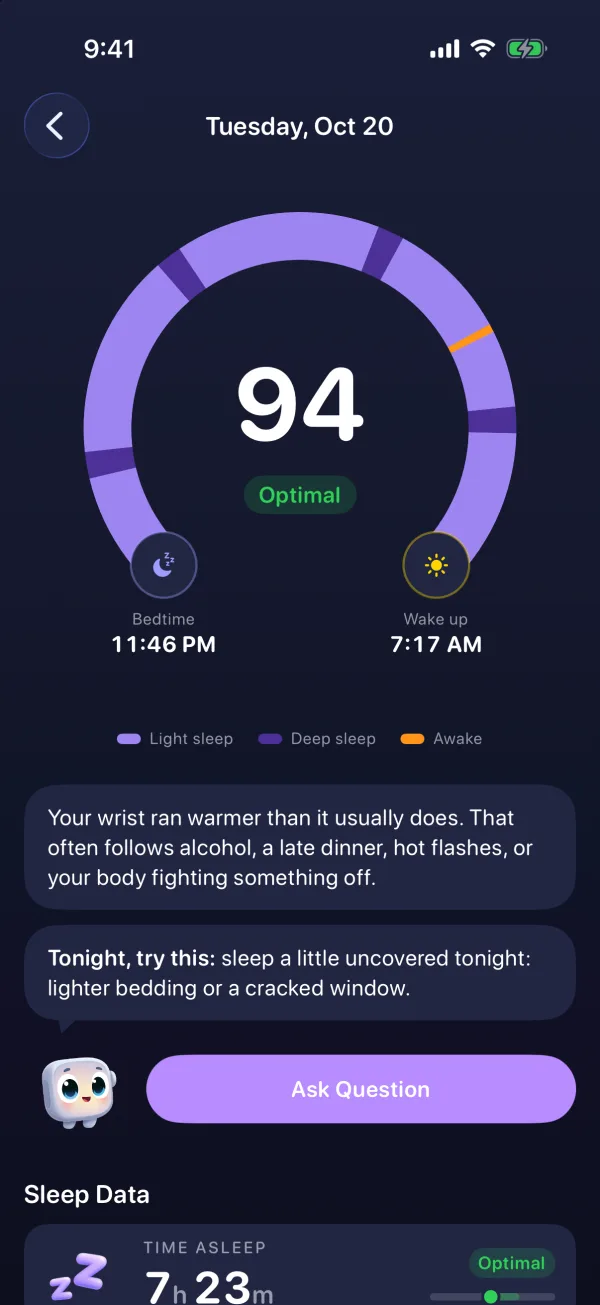
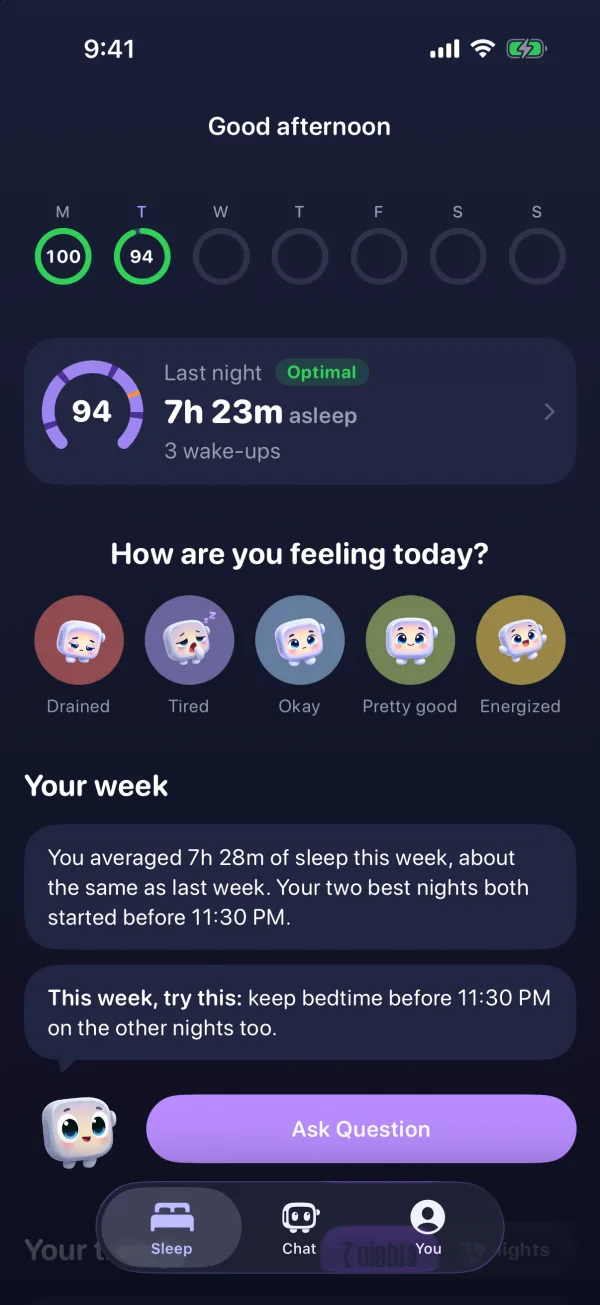
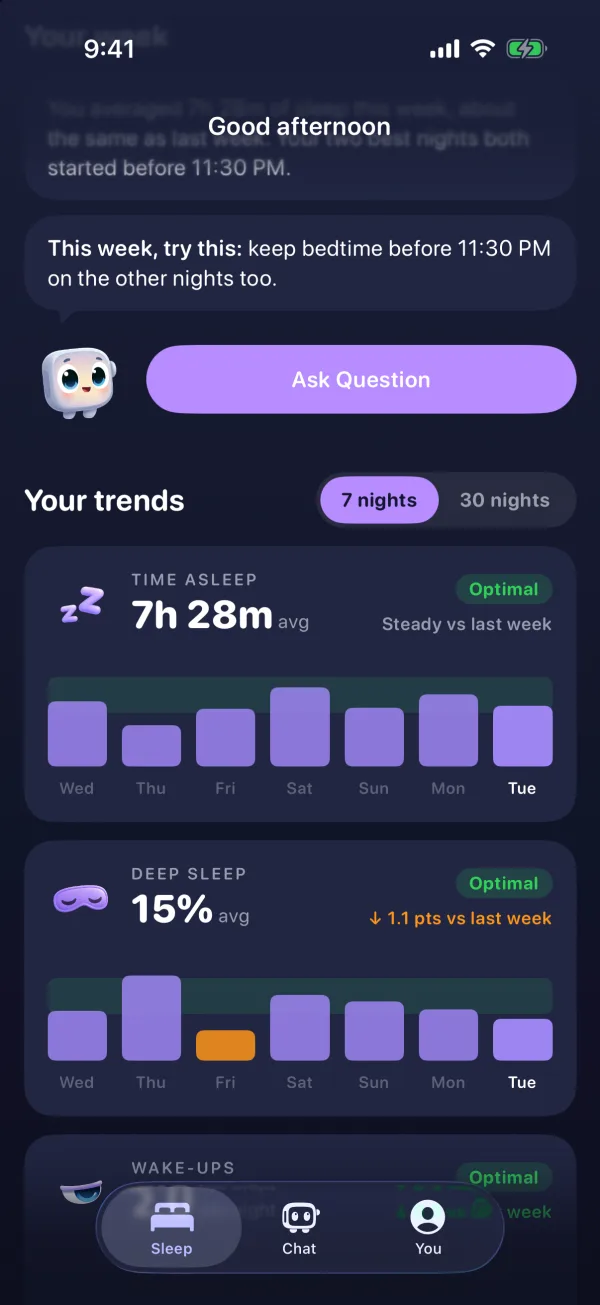
- The arc of your night. Each morning, a horseshoe from bedtime (a moon) to wake-up (a sun), colored by phase (light sleep, deep sleep, awake), with every wake-up marked in orange. Slide a finger along it to see what happened at any minute.
- Wristy explains it in plain words and gives you ONE simple thing to try tonight. Insights rotate, from short-night streaks to bedtime drift and warmer-than-usual nights.
- What is likely waking you. Sleepwrist finds the hour you wake up most and lines your wake-ups up with wrist temperature (Apple Watch Series 8 or later, and Ultra) or, on other models, with heart rate and sleep stages. For example: you wake twice as often on your warmer nights.
- Your body vs your usual. Wrist temperature and sleeping heart rate compared with your own last 30 nights, in words: "Just right", "A bit warm", "Calm", "A bit high".
- A sleep score in words (Optimal, Good, Fair, Poor), plus 7 and 30-night trends and a weekly recap.
- Mood and evening tags. A daily check-in on how rested you feel, and tags for alcohol, late caffeine, screen time or medication.
- On the watch. Your score and Wristy's one-liner, mood in one tap, complications, and a wind-down reminder 45 minutes before your usual bedtime that warns you if your battery won't last the night.
- Privacy. Health data is analyzed on your iPhone and is never sold or shared.
Sleepwrist does not measure stress or give an HRV stress score, and it is a wellness app, not a medical device.
Which one should you choose?
- Choose StressWatch if you want to notice stress during the day, get a nudge when it climbs, and see a fun character on your wrist.
- Choose Sleepwrist if your nights are the problem: waking at 3 AM, night sweats, or feeling tired after "enough" sleep.
- Use both if you like: they look at different parts of your day and both read from Apple Health.
Comparing more apps? See our best sleep apps for Apple Watch roundup, or Sleepwrist vs Welltory, another HRV-based app with more sleep features.
Frequently asked questions
What is the StressWatch app?
StressWatch is an iPhone and Apple Watch app that estimates your stress level from the heart rate and HRV your watch records, and alerts you when stress looks high. It is made by One Hundred Bad Ideas Limited and rated 4.7 on the US App Store as of October 2026.
Is the StressWatch app free?
It is free to download with basic stress monitoring. StressWatch Pro, a monthly or annual subscription, unlocks the paid features, as of October 2026.
Does StressWatch work on Apple Watch?
Yes. StressWatch has an Apple Watch app (watchOS 9 or later) and can be added to your watch face. It relies on HRV and resting heart rate data from Apple Health.
Is StressWatch a sleep tracker?
Not mainly. Its website lists a sleep analysis feature, but the app is built around stress. If you want detail on wake-ups, sleep phases and what disturbs your nights, a dedicated sleep app is a better fit.
Can I use StressWatch and Sleepwrist together?
Yes. Both read data from Apple Health, so using one does not stop the other from working.
Should I see a doctor about stress or poor sleep?
If stress or poor sleep affects your daily life for weeks, or you snore loudly, wake up gasping or feel exhausted every day, talk to your doctor. Neither app diagnoses medical conditions.
Sources
- App Store, StressWatch: AI Stress Monitor
- StressWatch, Stress Radar on Your Wrist
- Apple Support, Track your sleep on Apple Watch and use Sleep on iPhone
- Apple Support, Track your nightly wrist temperature changes with Apple Watch
- Sleep Foundation, Menopause and Sleep
This article is for general information and does not replace advice from your doctor. If your sleep problems last more than a few weeks or come with other symptoms, talk to a healthcare professional.