The best sleep apps for Apple Watch in 2026 (and who each one is for)
The best sleep app for Apple Watch depends on what keeps you up. We compare 9 sleep tracker apps on price, ratings and features, as of October 2026.
The best sleep app for Apple Watch depends on what you want from your nights. If you just want a free score, Apple's built-in Sleep app now gives you one. If you love detail and hate subscriptions, AutoSleep is the long-time favorite. And if you are a woman over 40 who keeps waking at night and wants to know why, in plain words, that is the gap Sleepwrist was built to fill.
A word of honesty first: we make Sleepwrist. To keep this list fair, every fact about the other apps comes from their App Store listing or official website as of October 2026, and we say where each one does something better than ours. This guide describes what you get based on listings and documentation, not lab tests. Features and prices change, so check the App Store before you decide.
The best sleep apps for Apple Watch at a glance
| # | App | Best for | Price model (App Store, Oct 2026) | App Store rating (Oct 2026) |
|---|---|---|---|---|
| 1 | Sleepwrist | Women 40+ who wake up at night | Subscription (yearly with free trial, or monthly) | New, not rated yet |
| 2 | Apple Sleep (built in) | A free score with nothing to install | Free, built into iPhone and Apple Watch | Not rated separately |
| 3 | AutoSleep | Detail lovers who want no subscription | $9.99 one-time purchase | 4.7 (about 62K ratings) |
| 4 | SleepWatch | Free tracking plus snoring recording | Free, optional Premium subscription | 4.7 (about 328K ratings) |
| 5 | Pillow | Smart alarm and nighttime sound recordings | Free, optional Premium subscription | 4.4 (about 96K ratings) |
| 6 | Sleep Cycle | Tracking with your phone on the nightstand | Free, optional Premium | 4.7 (about 31K ratings) |
| 7 | Rise | Sleep debt and planning your energy | Subscription required, 7-day free trial | 4.7 (about 72K ratings) |
| 8 | Welltory | Stress, energy and fatigue, with sleep inside | Free, optional Premium | 4.7 (about 134K ratings) |
| 9 | Bevel | Fitness, recovery and nutrition in one app | Free, optional Bevel Pro subscription | 4.8 (about 17K ratings) |
Ratings are the US App Store averages shown in October 2026, rounded.
How we chose these Apple Watch sleep tracking apps
We looked at about a dozen apps and kept the ones that pass these checks:
- They use the sleep your Apple Watch records, either through Apple Health or their own watch app, so you don't need to buy another device.
- They are actively updated. Every app on this list had an update in 2026.
- The price model is clear on the App Store listing (free, one-time, or subscription).
- They are well rated by a large number of people, or, for newer apps, they bring something the others don't.
- They have a clear purpose. The best sleep tracker for a marathon runner is rarely the best one for a woman waking at 3 AM.
If you have never tracked your sleep before, start with our guide on how to track sleep on Apple Watch. Every app below depends on that first step.
1. Sleepwrist: best for women 40+ who wake up at night
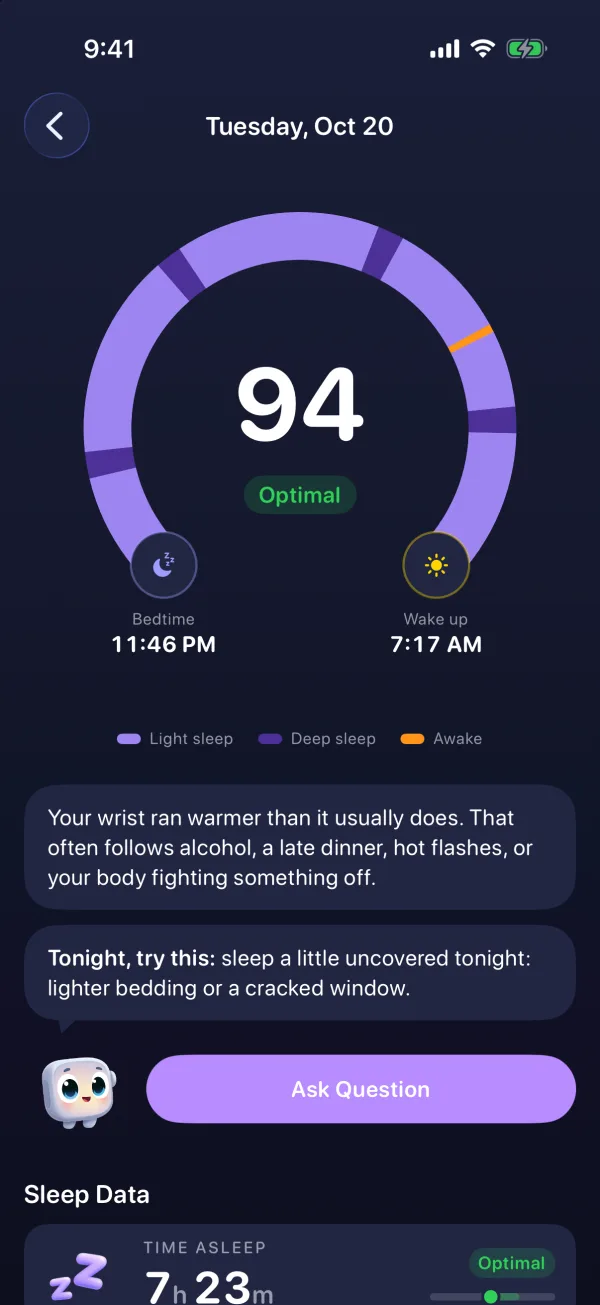
Sleepwrist reads the sleep your Apple Watch already records in Apple Health. There is nothing else to wear and no account to create. Each morning you get "the arc of your night": a horseshoe that runs from bedtime (a moon) to wake-up (a sun), colored by phase (light sleep, deep sleep, awake), with every wake-up marked in orange. You can tap it or slide a finger along it to see what happened at any minute.
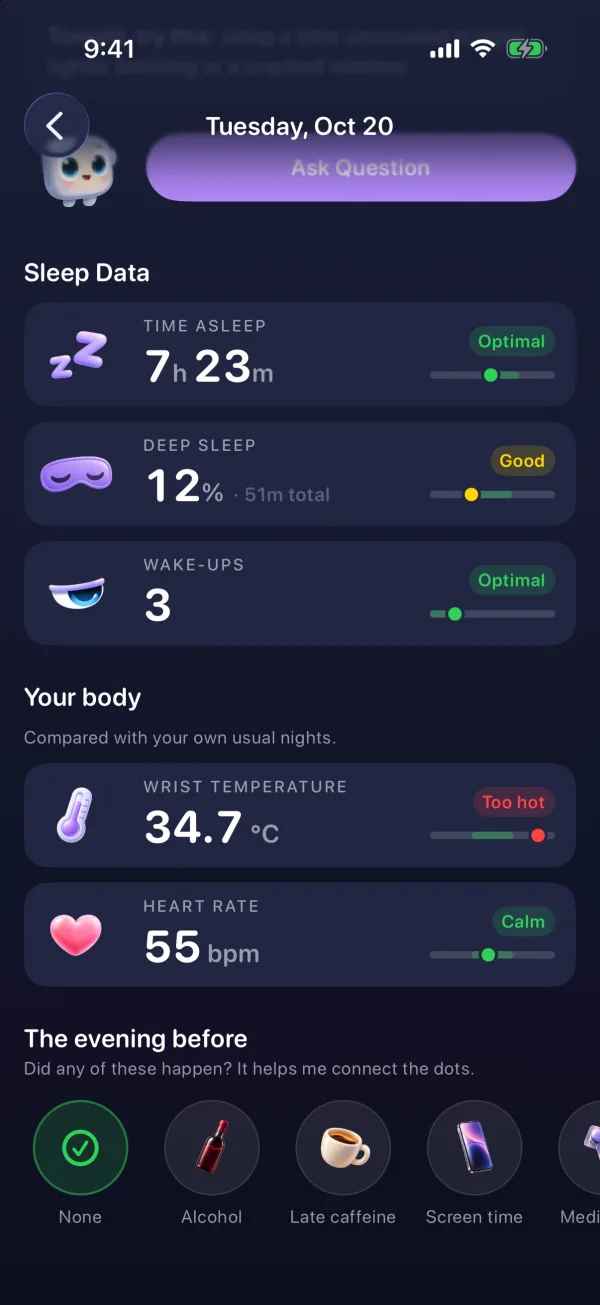
What it does well:
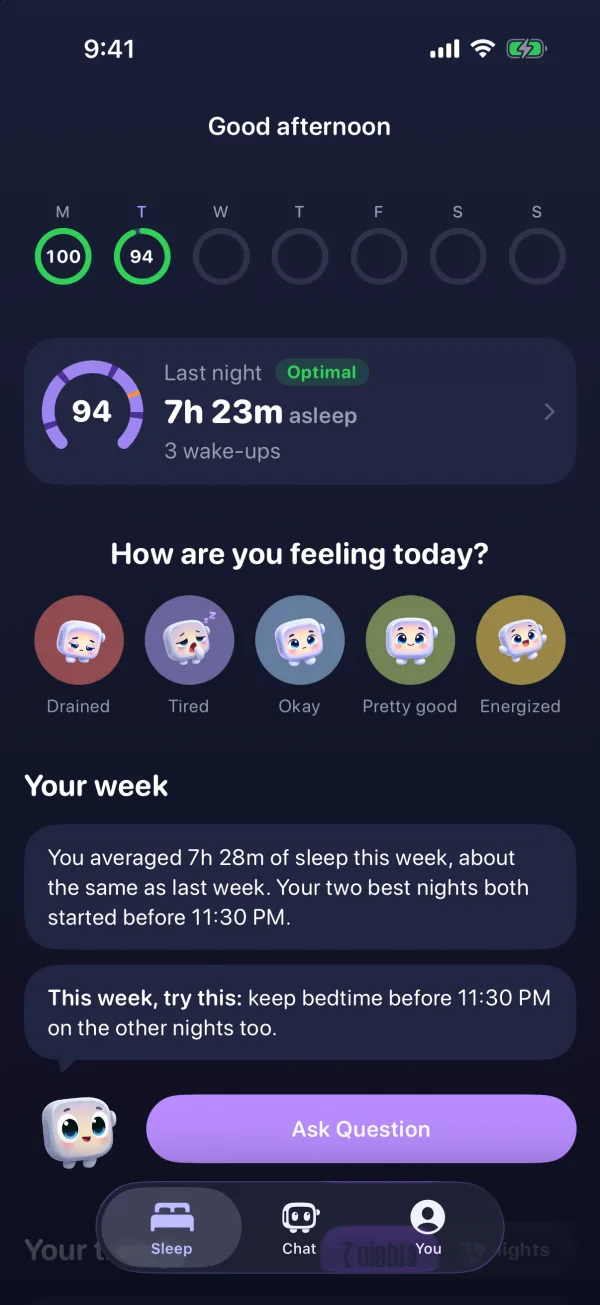
- Explains your night in plain words. Wristy, a friendly Apple Watch mascot, tells you what happened and gives you ONE simple thing to try tonight. The advice rotates, so you don't read the same tip every morning.
- Looks for what is waking you. It finds the hour you wake up most and lines your wake-ups up with your wrist temperature (Series 8 or later, and Ultra) or, on other models, with heart rate and sleep stages. For example, it can show that you wake twice as often on your warmer nights.
- Compares you with you. Wrist temperature and sleeping heart rate are judged against your own last 30 nights, in words like "Just right" or "A bit warm".
- Asks how you feel. A daily mood check-in, because feeling tired after a "good" night matters too.
- A sleep score in words first (Optimal, Good, Fair, Poor), plus 7 or 30-night trends and a weekly recap.
Who it's for: women in perimenopause or menopause, or anyone new to health data, who want answers without jargon.
Price: subscription, yearly with a free trial or monthly. Rating: new, no App Store rating yet.
Honest limitation: Sleepwrist is iPhone and Apple Watch only. It has no smart alarm, no snoring recording and no sleep sounds, and it is not a medical device (it does not detect sleep apnea). Ask Wristy, the private chat about your nights, needs an iPhone 15 Pro or newer.
2. Apple's built-in Sleep app: best free option
If you wear your watch to bed with sleep tracking on, you already have a capable sleep tracker. Apple shows your time in each sleep stage (Awake, REM, Core and Deep), plus heart rate and breathing rate during sleep. On Apple Watch Series 8 or later and Ultra models, it also tracks changes in your nightly wrist temperature.
Since watchOS 26, Apple adds a Sleep Score from 0 to 100 each morning. According to Apple Support, it is built from three parts: how long you slept (up to 50 points), how consistent your bedtime was over the previous 13 nights (up to 30 points) and interruptions during the night (up to 20 points). Scores are grouped from Very Low to Very High. We explain it in detail in our Apple Watch sleep score guide.
Who it's for: anyone who wants a clear, free summary without installing anything.
Price: free. Rating: built in, not rated as a separate sleep app.
Honest limitation: it is designed as a clean summary rather than a coach. You see what happened, but connecting it to why you woke up is mostly up to you. The Sleep app on the watch shows the last 14 days, with longer history in the Health app on iPhone.
3. AutoSleep: best for detail lovers who want no subscription
AutoSleep, by developer Tantsissa, has tracked sleep from the Apple Watch since 2016. Its listing promises fully automatic tracking with no buttons to press, and it can use Apple's own sleep stages. You get a sleep rating, sleep "rings", a sleep bank balance, readiness, wrist temperature, blood oxygen, breathing rate, a smart alarm, tags and notes, and deep history graphs.
It stands out on privacy and price: its listing says it has no analytics tracking and no data upload, and it costs $9.99 once, with no subscription.
Who it's for: people who enjoy numbers and want to own their app outright.
Price: $9.99 one-time. Rating: 4.7 (about 62K ratings). Last update: September 2026.
Honest limitation: it packs in a lot of stats, rings and graphs. That is great if you like digging, and a lot to take in if you only want to know why you keep waking up.
4. SleepWatch: best free tracker with snoring recording
SleepWatch, by Bodymatter, works with your Apple Watch on your wrist or your iPhone at your bedside. Each morning you get a sleep report with tips. Its listing covers total and restful sleep, sleeping heart rate and heart rate dip, sleep rhythm (how regular your schedule is), sleep disruptions and blood oxygen during sleep. It can also record sounds such as snoring, and offers a smart alarm and a white noise library. Its website adds a daily log of how rested you feel.
Who it's for: people who want a free starting point, and those curious about their snoring.
Price: free, with SleepWatch Premium (its listing quotes $4.99 a month or $39.99 a year). Rating: 4.7 (about 328K ratings, the most on this list). Last update: July 2026.
Honest limitation: several features, including personalized coaching, the smart alarm and parts of the sleep report, are marked as Premium in the listing. See our full Sleepwrist vs SleepWatch comparison.
5. Pillow: best for a smart alarm and nighttime sounds
Pillow, by Neybox Digital, detects your sleep automatically when you wear your Apple Watch. It shows a sleep stage diagram and a sleep score, can wake you in your lightest sleep with a smart alarm, and records nighttime audio events like snoring and sleep talking, processed on your device. You can also log your mood when you wake up and add notes to see what affects your nights, and there is a library of meditations and bedtime stories.
Who it's for: people who want a smart alarm and sound recordings in one familiar app.
Price: free, with Pillow Premium (monthly, quarterly or yearly). Rating: 4.4 (about 96K ratings). Last update: October 2026.
Honest limitation: much of the analysis, including heart rate analysis, trends, sound recordings and unlimited history, is listed as Premium.
6. Sleep Cycle: best if you don't always wear your watch to bed
Sleep Cycle is one of the oldest sleep apps on the App Store (2009). It is built around your phone on the nightstand: it listens to the sounds of your night (or uses motion) to track sleep, and wakes you with a smart alarm in your lightest phase. It also detects snoring, coughing and sleep talking, has an AI sleep coach called Luma, and includes sleep sounds and meditations. It has an Apple Watch app too.
Who it's for: people who don't like sleeping with a watch on, or want tracking that doesn't depend on it.
Price: free, with Premium. Rating: 4.7 (about 31K ratings). Last update: October 2026.
Honest limitation: it is phone-first, and its listing places Apple Health sync among the Premium tools.
7. Rise: best for sleep debt and daily energy
Rise focuses on two ideas: your sleep debt (how much sleep you owe your body) and your energy curve through the day, based on your circadian rhythm (your body clock). It reads sleep from Apple Health and Apple Watch, and also from Fitbit, Oura and other apps. It adds habit reminders, calendar integration, a smart alarm, sleep sounds and a sleep library.
Who it's for: people who want to plan their days around their energy and pay down sleep debt.
Price: a subscription (or the 7-day free trial) is required to use the app's content. Rating: 4.7 (about 72K ratings). Last update: October 2026.
Honest limitation: there is no free tier beyond the trial.
8. Welltory: best for stress, energy and fatigue
Welltory is a broad health app built around HRV (heart rate variability, the small changes in time between heartbeats). It tracks stress and an energy "battery", lets you log symptoms and flare-ups, and connects more than 1,000 devices and apps. For sleep, its newer Sleep Analysis for Apple Watch and Oura users includes a Sleep Score and a "Heart Rate Wave" that compares your night's heart rate with your own best nights.
Who it's for: people managing chronic fatigue, stress or conditions like POTS or long COVID, who want sleep as one piece of a bigger picture.
Price: free, with Welltory Premium (3-day free trial). Rating: 4.7 (about 134K ratings). Last update: October 2026.
Honest limitation: sleep is one part of a large app, and Welltory's help center says the Heart Rate Wave needs at least 30 nights of Apple Watch sleep data. Read our detailed Sleepwrist vs Welltory comparison.
9. Bevel: best all-in-one for fitness and recovery
Bevel, by Finerpoint, brings sleep, recovery, strain, stress, nutrition logging and strength training together in one app. Its Sleep Score looks at your stages, duration and interruptions, and a smart alarm can wake you at a good moment in your cycle. Bevel Intelligence, its AI assistant, connects the dots across your data.
Who it's for: active people who want one app for training, food and sleep.
Price: free, with Bevel Pro. Rating: 4.8 (about 17K ratings, the highest average in our top nine). Last update: October 2026.
Honest limitation: its focus is performance and training. It needs iOS 18 or later.
Also worth a look: Athlytic and StressWatch
Athlytic (MyndArc) is a recovery app with detailed sleep: stages, sleep debt, a target bedtime and overnight heart rate charts. It also checks wrist temperature against your normal range and answers questions in plain language with Apple Intelligence. Free with an Athlytic Pro subscription, rated 4.8 (about 11K ratings).
StressWatch is an HRV stress monitor with a cheerful character, Mr. Fizz, who changes color as your stress rises. It is mainly a stress app, with a sleep analysis section. See our Sleepwrist vs StressWatch comparison.
What to look for in a sleep app if you're over 40
Sleep often changes in midlife. The Sleep Foundation reports that up to 46% of people have sleep difficulties in the years before menopause, and hot flashes and night sweats can wake you and make it hard to fall back asleep. If that sounds like your nights, here is what matters most in an app:
- It shows your wake-ups clearly. A total sleep number hides the 3 AM wake-up. Look for an app that marks each one, and read our guide on why you wake up at 3 AM.
- It uses wrist temperature if your watch has it. Apple Watch Series 8 or later and Ultra models record nightly wrist temperature changes after about 5 nights of setup, according to Apple. Warmer nights can line up with night sweats.
- It compares you with your own normal, not with a 25-year-old athlete.
- It speaks your language. Words like "A bit warm" are easier to act on than a raw HRV figure.
- It respects your privacy. Check where your health data goes before you sign up.
One important note: no app on this list can diagnose a sleep disorder. The Sleep Foundation notes that sleep apnea becomes more common after menopause. If you snore loudly, wake up gasping or have morning headaches, talk to your doctor about a sleep test.
Which is the best sleep tracker app for you?
- You want to know why you keep waking up, in plain words: Sleepwrist.
- You want something free and already on your wrist: Apple's Sleep app.
- You want every number and no subscription: AutoSleep.
- You are curious about snoring: SleepWatch, Pillow or Sleep Cycle.
- You want to plan your energy around sleep debt: Rise.
- Stress, fatigue or a chronic condition is your main concern: Welltory.
- You train hard and want one app for everything: Bevel or Athlytic.
Many people use two: Apple's free Sleep Score, plus one app that answers their main question.
Frequently asked questions
What is the best sleep app for Apple Watch?
It depends on your goal. For a free score, Apple's built-in Sleep app is a strong start. AutoSleep suits people who want deep data without a subscription, and Sleepwrist is built for women over 40 who wake up at night and want plain-language explanations.
Does Apple Watch track sleep without an app?
Yes. With sleep tracking turned on and your watch worn to bed, Apple records your sleep stages, heart rate and breathing rate, and since watchOS 26 gives you a Sleep Score each morning. Apps like the ones above read that same data and add their own analysis.
What is the best free sleep tracker app?
Apple's built-in Sleep app is completely free. SleepWatch, Pillow, Sleep Cycle, Welltory and Bevel are also free to download, with paid upgrades for their fuller features, as of October 2026.
Is there a sleep app with no subscription?
Yes. As of October 2026, AutoSleep is a one-time $9.99 purchase with no in-app purchases. Apple's built-in Sleep app is free.
Can a sleep app tell me if I have sleep apnea?
Some apps record snoring or breathing sounds, but a sleep app is not a diagnosis. Sleepwrist does not detect sleep apnea. If you snore loudly, wake up gasping or feel exhausted every day, ask your doctor about a proper sleep test.
Which sleep app is best for menopause?
Look for an app that shows each wake-up, compares your wrist temperature with your own usual nights and explains things in plain words. Sleepwrist was designed around those needs. If hot flashes or night sweats are disrupting your sleep often, your doctor can also talk you through treatment options.
Sources
- Apple Support, Track your sleep on Apple Watch and use Sleep on iPhone
- Apple Support, View your sleep score on Apple Watch
- Apple Support, Track your nightly wrist temperature changes with Apple Watch
- Sleep Foundation, Menopause and Sleep
- App Store, AutoSleep: Watch Sleep Tracker
- App Store, SleepWatch - Top Sleep Tracker
- App Store, Pillow: Sleep Tracker
- App Store, Sleep Cycle - Tracker and Sounds
- App Store, RISE: Sleep Tracker
- App Store, Welltory: Stress and Heart Rate
- App Store, Bevel: AI Health Coach
- App Store, Athlytic: Fitness and Recovery
- App Store, StressWatch: AI Stress Monitor
This article is for general information and does not replace advice from your doctor. If your sleep problems last more than a few weeks or come with other symptoms, talk to a healthcare professional.